
Customer Report and DTI Flow
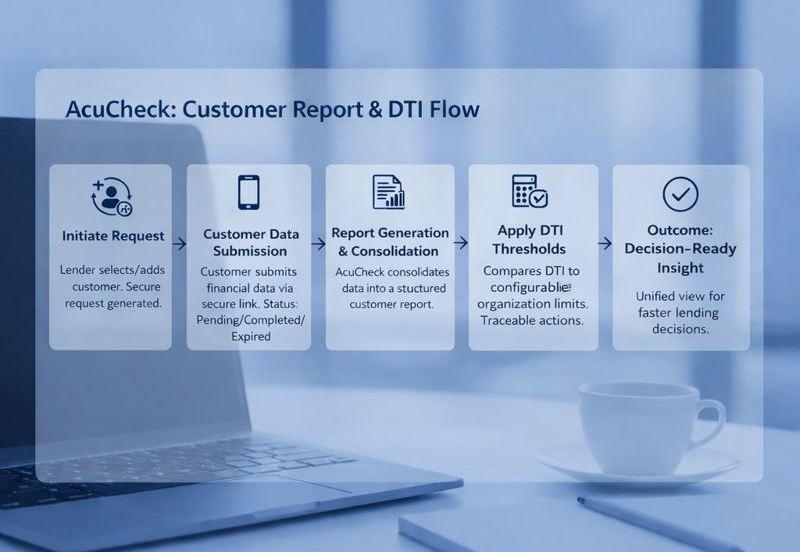
The Customer Report and DTI flow in AcuCheck describes how the customer financial
information moves through the platform from request initiation to debt-to-income (DTI)
evaluation resulting in a structured, decision-ready affordability outcome. This flow is
designed to minimize manual effort while maintaining visibility, consistency, and
traceability across every stage.
Initiating a Customer Report Request
The flow begins when a lender initiates a report request for an individual or business customer. Customers can be selected from existing records or added as part of the request process, ensuring continuity between customer management and reporting activities.
Once initiated, AcuCheck generates a secure request that is sent to the customer using the configured communication channels. Each request is uniquely tracked within the platform to support monitoring and follow-up.
Customer Data Submission and Request Tracking
Customers complete the request by submitting the required financial information through the secure link provided. During this stage, AcuCheck continuously tracks the status of the request, categorizing it as pending, completed, or expired.
Status visibility allows lenders to identify incomplete or expired requests quickly and take corrective action, such as resending the request link when permitted by configuration settings.
Report Generation and Consolidation
After successful submission, AcuCheck consolidates the customer’s financial information into a structured report. This report serves as the foundation for affordability assessment and downstream DTI calculation.
Each report remains associated with the customer record, enabling historical tracking and repeat assessments without duplicating customer data.
Debt-to-Income (DTI) Calculation
Using the generated report data, AcuCheck calculates the customer’s debt-to-income ratio based on standardized logic defined within the platform. The DTI calculation evaluates the relationship between the customer’s financial obligations and income, providing a consistent metric for affordability analysis.
Filters and selection controls allow users to apply DTI calculations to specific customers, supporting focused assessments without disrupting other report workflows.
Applying Configured DTI Thresholds
Calculated DTI values are evaluated against organization-defined thresholds configured in the platform settings. These thresholds help contextualize DTI results and support consistent interpretation across users and teams.
By separating calculation logic from configuration, AcuCheck enables policy adjustments without altering the core workflow.
Review, Visibility, and Notifications
Once DTI results are available, they become part of the customer’s report context and are accessible for review. Notifications and visual indicators help users stay informed about request completion, report availability, and key status changes.
All actions and outcomes remain traceable within AcuCheck, supporting internal review and operational transparency.
Outcome: Decision-Ready Affordability Insight
The flow concludes with a consolidated view of customer financial data and DTI results, providing lenders with decision-ready affordability insights. By unifying report management, DTI calculation, and status tracking in a single workflow, AcuCheck supports faster, more consistent lending decisions with reduced operational overhead.